Faire Case Pack & Quantity Sync Issues: How to Fix Them (and Prevent Costly Mis-Ships)
Faire Case Pack & Quantity Sync Issues: How to Fix Them (and Prevent Costly Mis-Ships)
Faire Case Pack & Quantity Sync Issues: How to Fix Them (and Prevent Costly Mis-Ships)
Dec 30, 2025
A Faire case pack or quantity sync issue occurs when a wholesale order placed on Faire is multiplied incorrectly when syncing to downstream systems (such as Shopify or a 3PL), causing brands to ship more product than the retailer ordered.
This most commonly happens when a product is sold by the case, but the unit definition in Faire does not match how the SKU is stored or fulfilled.
Quick Answer: What Usually Causes This?
In most cases, the problem is not the integration.
It’s the Faire product setup itself—specifically how units, cases, and SKUs are defined and mapped.
When one “unit” in Faire actually represents a case, but Faire thinks it represents a single, the system applies an unintended quantity multiplier (often ×6 or ×12).
Common Symptoms of a Faire Case Pack Problem
If your brand is experiencing any of the following, you likely have a case pack configuration issue:
A retailer orders 1 case, but Shopify shows 12 units or 12 cases
Someone on your Ops team manually edits every Faire order before fulfillment
Your 3PL occasionally ships far more product than expected
You rely on manual checks “just to be safe”
Mis-ships cost you product, postage, labor, and retailer goodwill
These symptoms are signals of a structural data problem, not a one-off mistake.
Why This Happens (In Plain English)
Most CPG brands:
Sell by the case
Store inventory as single units
Use the same SKU across Faire, Shopify, and their 3PL
The issue arises when:
A Faire product is listed as a case of 12 singles
Each “single” in Faire is mapped to a case-level SKU in Shopify
Faire multiplies the quantity before sending the order
Shopify and the 3PL interpret the order literally
The systems are doing exactly what they’re told, but the instructions were wrong.
Step-by-Step: How to Fix Faire Quantity Sync Issues
Step 1: Verify End-to-End SKU Mapping
Before changing product listings, confirm:
Each Faire SKU maps to the correct Shopify SKU
Each Shopify SKU maps to the correct 3PL SKU
If SKU mapping is wrong, fix that first.
If mapping is correct, continue.
Step 2: Audit the Faire Product’s Unit Definition
Ask one question:
Does “1 unit” in Faire equal “1 shippable unit” in real life?
If the answer is no, quantities will break downstream.
Red flags:
Faire “units” represent singles, but fulfillment ships cases
Case packs are implied in descriptions, not enforced structurally
Shopify receives multiplied quantities
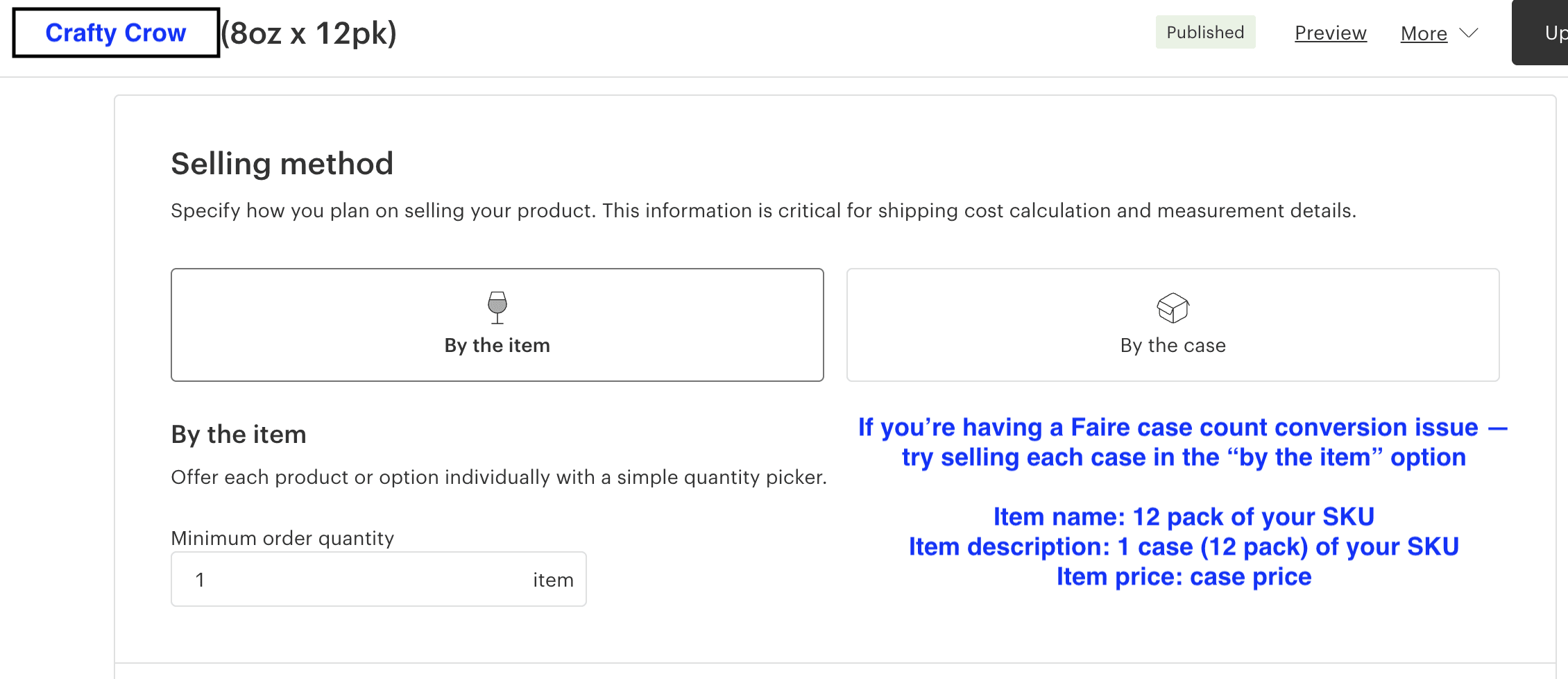
Step 3: Re-List the Product as a Case-Based Unit
The most reliable fix:
One Faire unit should equal one case.
Recommended setup:
Product name: “12-Pack Case of [SKU]”
Description explicitly states it is sold by the case
Item options reinforce “case of 12”
Price reflects the full case price
Quantity ordered = quantity shipped
This removes all implicit math from the sync.
In many cases, this fix takes under 10 minutes.
What This Fix Unlocks
Once case packs are modeled correctly at the product level:
Faire orders sync cleanly into Shopify
Fulfillment quantities become predictable
Manual order approvals disappear
Mis-ships drop dramatically
Downstream automations (tracking syncs, invoicing, reporting) become reliable
Most importantly, your Ops team stops acting as a safety net for broken logic.
Why Apps and 3PL Changes Rarely Fix This
Brands often try:
Bundling apps
Custom scripts
Switching 3PLs
Adding manual checkpoints
These may mask the issue, but they don’t fix the root cause.
If the product definition is wrong upstream, every downstream system will inherit the error.
When This Becomes a Bigger Ops Problem
If your brand:
Sells across Faire, Shopify, Amazon, and multiple 3PLs
Uses mixed units (singles, cases, bundles, variety packs)
Relies on tribal knowledge to avoid mistakes
Then case pack errors are usually just one symptom of a larger issue:
your systems are compensating for poor data design.
How Crafty Crow Helps
At Crafty Crow, we help lean CPG teams eliminate this kind of operational friction entirely.
Our work typically includes:
Auditing how products, SKUs, and case packs are modeled across systems
Fixing root-cause issues (not layering on more tools)
Automating order-to-cash workflows across Faire, Shopify, QuickBooks, and 3PLs
Building reporting and guardrails so errors don’t silently creep back in
The goal is fewer manual steps, cleaner data, and systems that run without constant oversight.
If your team is still manually approving orders “just in case,” that’s usually a sign the system can be designed better. Book a call today to chat.
FAQ
What causes Faire to multiply quantities incorrectly?
Usually a mismatch between how units are defined in Faire and how SKUs are fulfilled downstream.
Is this a Shopify integration issue?
Rarely. Shopify typically reflects whatever quantity Faire sends.
Do I need a bundling app?
In most cases, no. Correct product structure in Faire solves the issue.
How long does the fix take?
Often under 10 minutes once the root cause is identified.
A Faire case pack or quantity sync issue occurs when a wholesale order placed on Faire is multiplied incorrectly when syncing to downstream systems (such as Shopify or a 3PL), causing brands to ship more product than the retailer ordered.
This most commonly happens when a product is sold by the case, but the unit definition in Faire does not match how the SKU is stored or fulfilled.
Quick Answer: What Usually Causes This?
In most cases, the problem is not the integration.
It’s the Faire product setup itself—specifically how units, cases, and SKUs are defined and mapped.
When one “unit” in Faire actually represents a case, but Faire thinks it represents a single, the system applies an unintended quantity multiplier (often ×6 or ×12).
Common Symptoms of a Faire Case Pack Problem
If your brand is experiencing any of the following, you likely have a case pack configuration issue:
A retailer orders 1 case, but Shopify shows 12 units or 12 cases
Someone on your Ops team manually edits every Faire order before fulfillment
Your 3PL occasionally ships far more product than expected
You rely on manual checks “just to be safe”
Mis-ships cost you product, postage, labor, and retailer goodwill
These symptoms are signals of a structural data problem, not a one-off mistake.
Why This Happens (In Plain English)
Most CPG brands:
Sell by the case
Store inventory as single units
Use the same SKU across Faire, Shopify, and their 3PL
The issue arises when:
A Faire product is listed as a case of 12 singles
Each “single” in Faire is mapped to a case-level SKU in Shopify
Faire multiplies the quantity before sending the order
Shopify and the 3PL interpret the order literally
The systems are doing exactly what they’re told, but the instructions were wrong.
Step-by-Step: How to Fix Faire Quantity Sync Issues
Step 1: Verify End-to-End SKU Mapping
Before changing product listings, confirm:
Each Faire SKU maps to the correct Shopify SKU
Each Shopify SKU maps to the correct 3PL SKU
If SKU mapping is wrong, fix that first.
If mapping is correct, continue.
Step 2: Audit the Faire Product’s Unit Definition
Ask one question:
Does “1 unit” in Faire equal “1 shippable unit” in real life?
If the answer is no, quantities will break downstream.
Red flags:
Faire “units” represent singles, but fulfillment ships cases
Case packs are implied in descriptions, not enforced structurally
Shopify receives multiplied quantities
Step 3: Re-List the Product as a Case-Based Unit
The most reliable fix:
One Faire unit should equal one case.
Recommended setup:
Product name: “12-Pack Case of [SKU]”
Description explicitly states it is sold by the case
Item options reinforce “case of 12”
Price reflects the full case price
Quantity ordered = quantity shipped
This removes all implicit math from the sync.
In many cases, this fix takes under 10 minutes.
What This Fix Unlocks
Once case packs are modeled correctly at the product level:
Faire orders sync cleanly into Shopify
Fulfillment quantities become predictable
Manual order approvals disappear
Mis-ships drop dramatically
Downstream automations (tracking syncs, invoicing, reporting) become reliable
Most importantly, your Ops team stops acting as a safety net for broken logic.
Why Apps and 3PL Changes Rarely Fix This
Brands often try:
Bundling apps
Custom scripts
Switching 3PLs
Adding manual checkpoints
These may mask the issue, but they don’t fix the root cause.
If the product definition is wrong upstream, every downstream system will inherit the error.
When This Becomes a Bigger Ops Problem
If your brand:
Sells across Faire, Shopify, Amazon, and multiple 3PLs
Uses mixed units (singles, cases, bundles, variety packs)
Relies on tribal knowledge to avoid mistakes
Then case pack errors are usually just one symptom of a larger issue:
your systems are compensating for poor data design.
How Crafty Crow Helps
At Crafty Crow, we help lean CPG teams eliminate this kind of operational friction entirely.
Our work typically includes:
Auditing how products, SKUs, and case packs are modeled across systems
Fixing root-cause issues (not layering on more tools)
Automating order-to-cash workflows across Faire, Shopify, QuickBooks, and 3PLs
Building reporting and guardrails so errors don’t silently creep back in
The goal is fewer manual steps, cleaner data, and systems that run without constant oversight.
If your team is still manually approving orders “just in case,” that’s usually a sign the system can be designed better. Book a call today to chat.
FAQ
What causes Faire to multiply quantities incorrectly?
Usually a mismatch between how units are defined in Faire and how SKUs are fulfilled downstream.
Is this a Shopify integration issue?
Rarely. Shopify typically reflects whatever quantity Faire sends.
Do I need a bundling app?
In most cases, no. Correct product structure in Faire solves the issue.
How long does the fix take?
Often under 10 minutes once the root cause is identified.
A Faire case pack or quantity sync issue occurs when a wholesale order placed on Faire is multiplied incorrectly when syncing to downstream systems (such as Shopify or a 3PL), causing brands to ship more product than the retailer ordered.
This most commonly happens when a product is sold by the case, but the unit definition in Faire does not match how the SKU is stored or fulfilled.
Quick Answer: What Usually Causes This?
In most cases, the problem is not the integration.
It’s the Faire product setup itself—specifically how units, cases, and SKUs are defined and mapped.
When one “unit” in Faire actually represents a case, but Faire thinks it represents a single, the system applies an unintended quantity multiplier (often ×6 or ×12).
Common Symptoms of a Faire Case Pack Problem
If your brand is experiencing any of the following, you likely have a case pack configuration issue:
A retailer orders 1 case, but Shopify shows 12 units or 12 cases
Someone on your Ops team manually edits every Faire order before fulfillment
Your 3PL occasionally ships far more product than expected
You rely on manual checks “just to be safe”
Mis-ships cost you product, postage, labor, and retailer goodwill
These symptoms are signals of a structural data problem, not a one-off mistake.
Why This Happens (In Plain English)
Most CPG brands:
Sell by the case
Store inventory as single units
Use the same SKU across Faire, Shopify, and their 3PL
The issue arises when:
A Faire product is listed as a case of 12 singles
Each “single” in Faire is mapped to a case-level SKU in Shopify
Faire multiplies the quantity before sending the order
Shopify and the 3PL interpret the order literally
The systems are doing exactly what they’re told, but the instructions were wrong.
Step-by-Step: How to Fix Faire Quantity Sync Issues
Step 1: Verify End-to-End SKU Mapping
Before changing product listings, confirm:
Each Faire SKU maps to the correct Shopify SKU
Each Shopify SKU maps to the correct 3PL SKU
If SKU mapping is wrong, fix that first.
If mapping is correct, continue.
Step 2: Audit the Faire Product’s Unit Definition
Ask one question:
Does “1 unit” in Faire equal “1 shippable unit” in real life?
If the answer is no, quantities will break downstream.
Red flags:
Faire “units” represent singles, but fulfillment ships cases
Case packs are implied in descriptions, not enforced structurally
Shopify receives multiplied quantities
Step 3: Re-List the Product as a Case-Based Unit
The most reliable fix:
One Faire unit should equal one case.
Recommended setup:
Product name: “12-Pack Case of [SKU]”
Description explicitly states it is sold by the case
Item options reinforce “case of 12”
Price reflects the full case price
Quantity ordered = quantity shipped
This removes all implicit math from the sync.
In many cases, this fix takes under 10 minutes.
What This Fix Unlocks
Once case packs are modeled correctly at the product level:
Faire orders sync cleanly into Shopify
Fulfillment quantities become predictable
Manual order approvals disappear
Mis-ships drop dramatically
Downstream automations (tracking syncs, invoicing, reporting) become reliable
Most importantly, your Ops team stops acting as a safety net for broken logic.
Why Apps and 3PL Changes Rarely Fix This
Brands often try:
Bundling apps
Custom scripts
Switching 3PLs
Adding manual checkpoints
These may mask the issue, but they don’t fix the root cause.
If the product definition is wrong upstream, every downstream system will inherit the error.
When This Becomes a Bigger Ops Problem
If your brand:
Sells across Faire, Shopify, Amazon, and multiple 3PLs
Uses mixed units (singles, cases, bundles, variety packs)
Relies on tribal knowledge to avoid mistakes
Then case pack errors are usually just one symptom of a larger issue:
your systems are compensating for poor data design.
How Crafty Crow Helps
At Crafty Crow, we help lean CPG teams eliminate this kind of operational friction entirely.
Our work typically includes:
Auditing how products, SKUs, and case packs are modeled across systems
Fixing root-cause issues (not layering on more tools)
Automating order-to-cash workflows across Faire, Shopify, QuickBooks, and 3PLs
Building reporting and guardrails so errors don’t silently creep back in
The goal is fewer manual steps, cleaner data, and systems that run without constant oversight.
If your team is still manually approving orders “just in case,” that’s usually a sign the system can be designed better. Book a call today to chat.
FAQ
What causes Faire to multiply quantities incorrectly?
Usually a mismatch between how units are defined in Faire and how SKUs are fulfilled downstream.
Is this a Shopify integration issue?
Rarely. Shopify typically reflects whatever quantity Faire sends.
Do I need a bundling app?
In most cases, no. Correct product structure in Faire solves the issue.
How long does the fix take?
Often under 10 minutes once the root cause is identified.
Sign up for our free newsletter
Get ideas for incorporating the latest in automation and AI in operations, directly to your inbox
Sign up for our free newsletter
Get ideas for incorporating the latest in automation and AI in operations, directly to your inbox
Sign up for our free newsletter
Get ideas for incorporating the latest in automation and AI in operations, directly to your inbox
AI agents and workflow automation SaaS for CPG brand Operations teams
AI agents and workflow automation SaaS for CPG brand Operations teams
AI agents and workflow automation SaaS for CPG brand Operations teams